



Description
Download Open Hardware Monitor – monitor, temperature, fan speeds, CPU clock frequency, voltages, real-time, system performance, hardware monitoring, PC, computer, sensor, utility, tool, open-source, free, open hardware monitor
Overview
Open Hardware Monitor is a free, open-source utility designed to provide real-time monitoring of critical hardware metrics within a computer system. The application focuses on tracking temperature, fan speeds, CPU clock frequency, and voltages—key indicators of system health and performance. By offering transparent access to these metrics, the app helps users detect potential overheating issues, optimize cooling efficiency, and maintain stable system operation. It is particularly valuable for users who engage in high-performance computing tasks such as gaming, video editing, or overclocking, where hardware stability is crucial. The developer, Open Hardware Monitor, has positioned the tool as a lightweight, no-installation-required solution, emphasizing accessibility and simplicity. While the developer did not provide additional technical details about the development team or organizational background, the open-source nature of the project suggests transparency and community-driven improvements. The app is intended for both casual users seeking basic system insights and advanced users requiring granular control over hardware monitoring. Its real-world use cases include diagnosing thermal throttling, verifying cooling system effectiveness, and ensuring safe operation during intensive workloads. In the broader app ecosystem, Open Hardware Monitor fills a niche as a specialized system utility that complements more general-purpose performance tools.
Key Features & Functionality
- Temperature Sensor Monitoring: Tracks internal temperature readings from multiple sensors across the motherboard, CPU, GPU, and storage devices. This allows users to verify whether components are operating within safe thermal ranges and identify potential hotspots.
- Fan Speed and CPU Clock Frequency Tracking: Provides live updates on fan rotation speeds and CPU clock rates, enabling users to correlate performance changes with cooling behavior and system load.
- Voltage Monitoring: Displays real-time voltage levels across critical system components, helping users detect power supply irregularities that could lead to instability or hardware damage.
- Minimal Setup and Configuration: Requires no traditional installation—users can run the application directly from a portable executable. It supports automatic startup with Windows through a simple toggle, enhancing convenience for regular monitoring.
- Customizable Display and Units: Offers flexible interface settings, including the ability to rename components, adjust temperature units (Celsius or Fahrenheit), and modify sensor update intervals for optimal responsiveness.
- Real-Time Data Visualization: Delivers continuous, up-to-date information on all monitored parameters, allowing immediate response to performance anomalies or thermal spikes.
These features are especially beneficial during intensive tasks like rendering, gaming, or system stress testing. For example, a user can observe how CPU temperatures rise during a 4K video export and verify whether fan speeds increase accordingly. Similarly, overclockers can use the tool to validate stable clock frequencies and voltage levels under load, reducing the risk of hardware failure.
Interface, UX & Performance
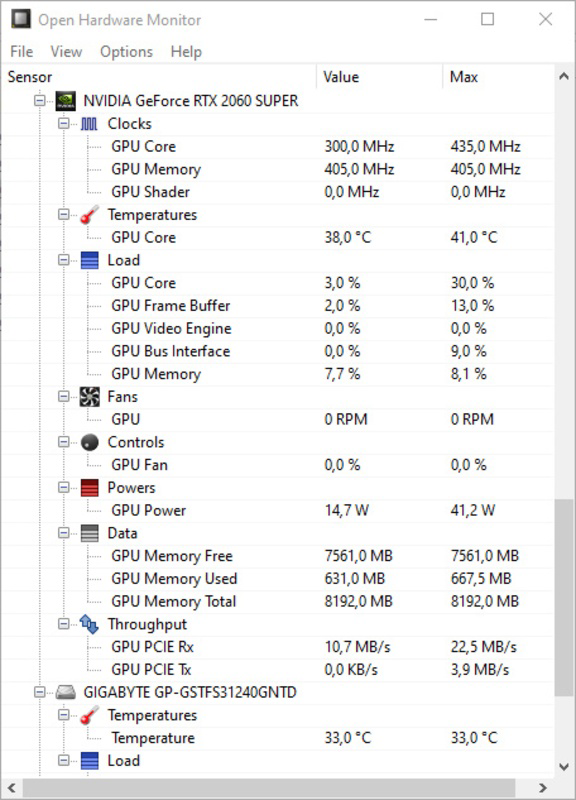
The user interface of Open Hardware Monitor is clean, minimalistic, and focused on functionality. It presents hardware data in a tabular format with clearly labeled columns for each monitored parameter, allowing users to scan critical metrics at a glance. Navigation is straightforward, with intuitive right-click options for renaming components and adjusting settings. The layout is consistent across different screen sizes, though the developer did not specify formal performance metrics or compatibility with specific device categories. Although the developer did not list formal performance metrics, the app’s small file size of 2.7 MB suggests a lightweight footprint, which typically correlates with low resource consumption. Responsiveness is expected to be high due to the direct access to hardware sensors without heavy background processes. Stability is likely maintained through the app’s open-source model, where community contributions help identify and resolve bugs. Users can expect consistent performance during extended monitoring sessions, though real-world behavior may vary depending on system configuration and sensor availability. The interface remains accessible without requiring advanced technical knowledge, making it suitable for both novice and experienced users.
Platform Compatibility & Technical Requirements
Open Hardware Monitor is designed for the Windows platform and is compatible with the latest versions of the Windows operating system. The app is available in a portable executable format, meaning it does not require installation and can be run directly from a USB drive or local folder. The software version is 0.9.3, and the file size is 2.7 MB, indicating a compact and efficient design. Specific requirements such as minimum OS version, processor architecture, or RAM specifications were not listed by the developer. The developer did not specify minimum OS requirements, so users should ensure their system supports running portable executables. Compatibility with different hardware configurations is implied through sensor detection, but no formal testing matrix was provided. As a result, performance and functionality may vary depending on the underlying hardware and BIOS support for sensor data.
Pros and Cons
Pros
- Free and open-source, ensuring transparency and community trust
- Lightweight with a small file size of 2.7 MB
- Portable—no installation required; runs directly from a folder or USB
- Real-time monitoring of temperature, fan speeds, CPU clock frequency, and voltages
- Simple and intuitive interface suitable for both beginners and advanced users
- Supports automatic startup with Windows for continuous monitoring
Cons
- Developer did not provide detailed technical specifications or compatibility information
- Limited to Windows platform; no support for macOS or Linux
- Interface lacks advanced visualization tools such as graphs or historical data logging
- No built-in alert system for temperature thresholds or system anomalies
- Customization options are basic and may not satisfy power users seeking deep configuration
FAQ
Is Open Hardware Monitor safe to download and use?
Yes, Open Hardware Monitor is a free, open-source application developed by a transparent community. It does not contain malware or adware, and its source code is publicly available for review. Users can verify its integrity by downloading from official project repositories.
Can I run Open Hardware Monitor without installing it?
Yes, the app is designed as a portable executable. You can run it directly from a folder or USB drive without installing it on your system.
Does Open Hardware Monitor support macOS or Linux?
Based on current information, Open Hardware Monitor is only available for the Windows platform. There is no official support for macOS or Linux.
How often does the app update sensor data?
The update interval for sensor readings can be customized in the settings. The default interval is typically set to refresh data every few seconds, though users can adjust it based on their monitoring needs.
Do I need to configure sensors manually?
No manual configuration is required. The app automatically detects available sensors on the system. Users can rename or reorganize components via right-click options for better clarity.
Final Thoughts
Open Hardware Monitor stands out as a reliable, no-frills tool for users who need accurate, real-time insights into their PC’s hardware performance. Its open-source nature, lightweight design, and ease of use make it a trusted choice for both everyday users and tech enthusiasts. While it lacks advanced features like historical logging or alert notifications, its core functionality is solid and well-executed. The ability to monitor temperature, fan speeds, CPU clock frequency, and voltages without installation adds significant value. For anyone looking to maintain system stability, prevent overheating, or fine-tune performance, this app delivers tangible benefits. Whether you're a gamer, content creator, or system administrator, Open Hardware Monitor provides essential data in a simple, accessible format. Download Open Hardware Monitor now.
Guides & Tutorials for Open Hardware Monitor
How to install Open Hardware Monitor
- Click the Preview / Download button above.
- Once redirected, accept the terms and click Install.
- Wait for the Open Hardware Monitor download to finish on your device.
How to use Open Hardware Monitor
This software is primarily used for its core features described above. Open the app after installation to explore its capabilities.
User Reviews for Open Hardware Monitor 0
No reviews found


